In today’s competitive virtual job market, your resume is more than just a document—it is your first impression. Before you ever speak to a client or recruiter, your resume speaks for you.
As SOVA continues to hire and review applications, one clear pattern has emerged from the recruiter’s side. Many aspiring Virtual Assistants are putting effort into making their resumes visually attractive, but unintentionally hurting their chances of getting hired.
This article is a gentle yet important reminder from Coach Katherine Padilla, co-founder of SOVA and an active recruiter, on how to create a resume that actually gets seen—by both AI systems and human decision-makers.
The Resume Trend That’s Costing VAs Opportunities
Many resumes today are:
- Very colorful
- Designed in Canva
- Using two-column layouts
- Filled with icons, graphics, and creative formatting
- Even embedded with music or animations
While these designs may look impressive at first glance, here’s the reality:
Most clients and agencies now use AI-powered resume screeners.
If an AI system cannot properly read or interpret your resume, it may never reach a human recruiter—no matter how skilled or experienced you are.
Canva Resumes vs. Hiring-Ready Resumes
There is a crucial distinction every VA must understand:
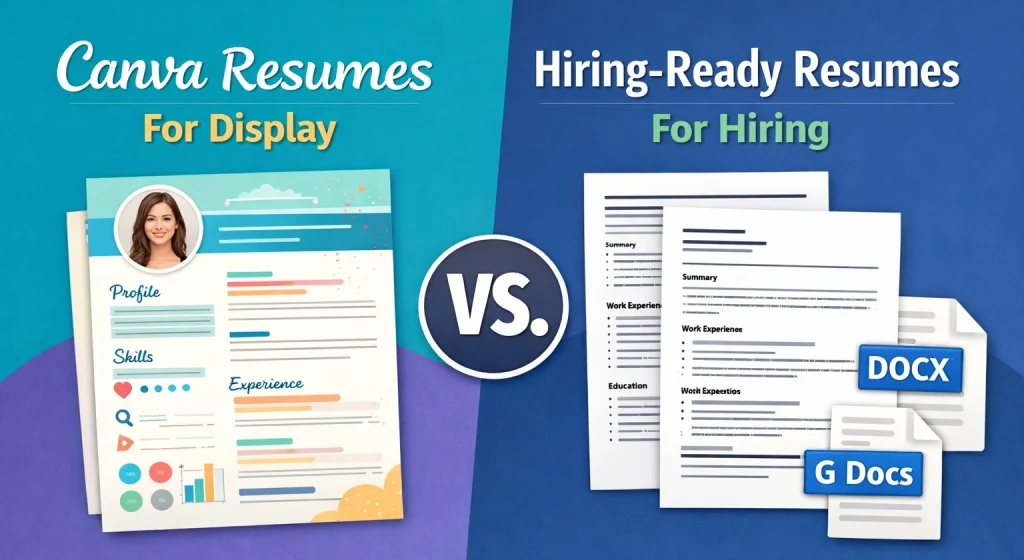
Canva resumes are for display.
Google Docs or Word resumes are for hiring.
Creative resumes are great for portfolios or presentations, but when it comes to actual job applications, clarity and structure matter more than design.
AI systems prioritize:
- Readable text
- Clear headings
- Consistent formatting
- Detectable job titles, skills, and dates
If your resume confuses the system, it gets filtered out early.
What Makes a Resume AI-Friendly and Client-Ready
To increase your chances of getting shortlisted, your resume should follow these industry standards:
1. Use the Correct Format
While Canva is great for design, it often saves text as “elements” or images that AI cannot read. Avoid PDF files unless the client asks for one. PDFs can sometimes “flatten” text into a single layer that confuses older ATS software. Using a standard .docx or Google Doc ensures the AI can highlight your keywords effortlessly.
2. Stick to a Single-Column Layout
- Two-column resumes often break AI readability – AI scans a document from left to right, just like a human. When you use two columns, the software often reads straight across the page, mixing your “Skills” column with your “Work Experience” column. This creates a jumbled mess of data that the system may simply reject.
- A single-column layout ensures all information is scanned correctly
3. Keep It Short and Focused
Recruiters and clients often have dozens of resumes to review daily. A concise, two-page resume shows that you can prioritize information and respect their time. If it’s too long, the most important details get buried; if it’s too short, you might look inexperienced.
4. Maintain a Clean, Professional Look
Heavy colors, custom icons, and complex graphics are “noise” to an AI. They can cause parsing errors where your text becomes unreadable. A professional, white-space-heavy design ensures that the focus remains on your qualifications, not your graphic design skills.
5. Write Responsibilities in Bullet Points
Walls of text are the enemy of readability. Use bullet points to break down your achievements. This makes your resume “scannable”—allowing both the AI and the hiring manager to quickly identify your key contributions and successes.Avoid long paragraphs
6. Use Clear Job Titles and Dates
AI software is specifically designed to calculate your “total years of experience” in a certain role. Use standard job titles (e.g., “Project Manager” instead of “Task Ninja”) and consistent date formats (e.g., MM/YYYY) so the system can accurately map your career progression.
7. List Skills Plainly
Avoid “creative” self-ratings or flowery language. Instead of saying you are a “Master of Communication,” simply list “Communication.” AI looks for specific keywords that match the job description. If you use non-standard wording, the AI might miss a skill you actually possess.
8. Protect Your Privacy
In the digital age, a full home address is a privacy risk and unnecessary for the initial screening. Providing your City and Country (or Timezone) is enough for a client to know if you are a logistical fit for the role.
9. Add References Only When Requested
Your resume is prime real estate. Including references takes up valuable space that could be used for your achievements. Furthermore, it protects the privacy of your mentors and past colleagues until the client is serious enough to make an offer.
File Naming Matters More Than You Think
In a sea of digital applications, your file name is actually your first handshake. Before a recruiter even reads your experience, they see how you organize your data. A messy file name suggests a messy workflow, while a structured one signals a high-level professional.
Avoid names like:
- Resume-final-final-v3.pdf
- MyResume2025.docx
The Professional Formula
To keep it simple, always use this “Golden Rule” for naming: [Full Name] – [Target Job Title] – Resume
Example: Katherine Padilla – Executive VA – Resume
Why this works: It’s clean, it’s descriptive, and it uses dashes (–) which are easy for both human eyes and computer operating systems to read without creating glitches.
Why Simplicity Wins in Hiring
Clients do not have time to “figure out” a resume.
If it is hard to read, hard to scan, or hard to identify, they move on—quickly.
A clean resume communicates:
- You understand industry standards
- You value clarity and efficiency
- You are ready to work in a professional environment
If you want to position yourself as a top-tier Virtual Assistant, mastering tools is not enough. You must also understand how hiring actually works.
Learn How to Get Hired, Not Just Skilled
At SOVA – School of Virtual Assistance Philippines, we go beyond teaching technical skills.
We teach:
- How recruiters think
- How AI screening works
- How to present yourself professionally
- How to get hired, not just trained
📌 If you want to master resume standards, client expectations, and real-world hiring practices, enroll now at SOVA.
Stay Connected with Coach Katherine
For more practical advice on freelancing, hiring standards, and building a successful VA career, follow Coach Kathy Padilla on Facebook for regular insights and real-world tips straight from the recruiter’s perspective.
Because skills open doors—but knowing how to present them gets you inside.

